This guide walks you through registering on ForTon for the first time. Registration activates your Level 1 in the Base program and gives you a personal referral link. The whole process takes 3–5 minutes and costs 1 TON + a small gas fee.
✅ Before You Start
Make sure you have:
-
Tonkeeper installed and set up (see Tonkeeper Setup guide)
-
At least 2 TON in your wallet (1 TON for activation + ~0.05–0.1 TON gas + reserve)
-
Your invitation link from the person who referred you (Upline ID)
-
5 minutes of uninterrupted time
-
⚠️ Always use the official link: https://forton.app — never click ForTon links from DMs or unknown sources.
📱 Step 1 — Open ForTon in Tonkeeper Browser
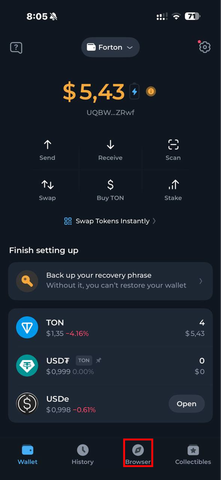
For the smoothest experience, open forton.app inside Tonkeeper's built-in dApp browser:
-
Open Tonkeeper
-
Tap the Browser icon at the bottom
-
Enter forton.app in the address bar (or paste your referral link)
-
Tap Go
-
You can also use Chrome or Safari on desktop, but mobile dApp browser is recommended for fewer connection errors.
🔗 Step 2 — Connect Your Wallet
-
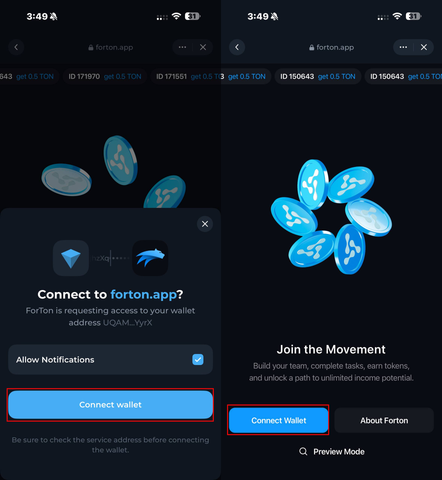
On forton.app, tap Connect Wallet
-
Tonkeeper will pop up a confirmation — tap Connect
-
Return to forton.app — your wallet address should now appear in the top-right corner
⚠️ If the wallet doesn't connect, try refreshing the page and reconnecting. Don't disconnect while a transaction is pending.
👤 Step 3 — Verify Your Upline ID
Your Upline ID is the wallet address of the person who invited you. It's automatically filled if you opened a referral link.
-
Check that the Upline ID matches your inviter's address
-
If the field is empty, ask your inviter to send you their referral link again
-
You cannot change your Upline ID after registration — double-check before confirming
✍️ Step 4 — Confirm Registration
-
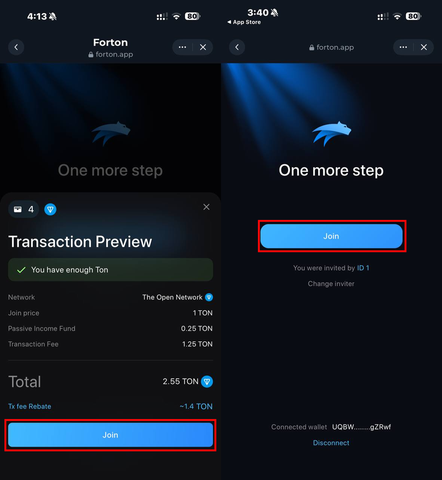
Tap Join on the registration screen
-
Review the cost: 1 TON + gas fee (~0.05–0.1 TON)
-
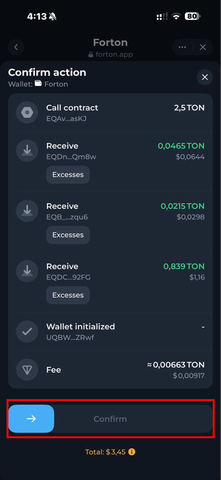
Tap Confirm
-
Tonkeeper will pop up — review the transaction details and swipe to confirm
-
Wait 10–30 seconds for the transaction to be processed on TON
🎉 Step 5 — You're In!
Once the transaction confirms, you'll see:
-
✅ Level 1 in Base program activated
-
✅ Your personal referral link generated
-
✅ Your dashboard with team statistics and earnings
Copy your referral link from the dashboard — share it with friends to start earning from your team.
🚀 What's Next?
After registration, you can:
-
Activate higher Base levels for bigger earnings (see About Base Program)
-
Activate Trinity program for FRT-based rewards (see About Trinity Program)
-
Invite partners using your personal referral link
-
Earn Points and prepare for Airdrop 3.0 (see Points and Airdrop)
⚠️ Common Mistakes to Avoid
-
❌ Using a link from DMs or fake "ForTon" Telegram bots — always go through forton.app
-
❌ Not having enough TON for gas — keep at least 0.2 TON extra in your wallet
-
❌ Closing the app while a transaction is pending — wait for confirmation
-
❌ Sharing your seed phrase with anyone claiming to be "support" — ForTon will never ask for it
-
❌ Registering under the wrong Upline ID — verify before confirming
🛡 Security Reminder
-
🔒 Bookmark forton.app — don't search on Google
-
🔒 Never share your 24-word seed phrase
-
🔒 Verify all transaction details in Tonkeeper before swiping to confirm
-
🔒 Report suspicious links and fake admins to t.me/fortontalk
💬 Still have questions? Start a chat with our support team.